WELCOME TO EHOST.COM.NP
Showing posts with label GSM. Show all posts

Wednesday, September 21, 2016

FIX Missing Personal Hotspot Option in Reliance JIO 4G

A lot of BUZZ is going on about Reliance JIO 4G and people are making a mess by jumping in to get a single SIM by which they can enjoy unlimited HD VoLTE calling and utilizing free Internet. I have earlier posted about Reliance 4G on how you can get a SIM for yourself or any of your family member. All the devices that support Reliance JIO 4g and even using Reliance JIO 4G on 3G phones.

reliance jio 4g personal hotspot missing

So I even tried to get my hands on it but I was not keen enough to invest Rs.3500 approx. to get those buggy LYF phones. So I waited till the time my iPhone SE gets full support for this and yesterday i got my hands on a single SIM but I had to pay Rs.300 extra as a bribe kind of thing to get a single SIM.

And today my Reliance JIO 4G got activated. But there was a problem I was not able to use the Personal Hotspot feature as the option was missing in my iPhone SE while using Reliance JIO 4G but on my Airtel number it was there, so I just made a search to find a solution ad got to know many people were facing this problem.

Luckily a solution was posted and it worked. So check below steps on getting that missing Personal Hotspot feature on your iPhone or other iOS device while using Reliance JIO 4G.

How to use Personal Hotspot Feature on iPhone SE while using Reliance JIO 4G

The method is very simple and it will work for your instantly, you just need to add a simple line in your APN which is short for Access Point and you will get back your Personal Hotspot feature.

  1. After your Reliance JIO 4G SIM is activated, you need to insert it and navigate to Mobile networks.
  2. Activate mobile network and then under its options you need to select LTE option.
  3. It might show you some warnings that this network won’t work fine on your device and blah blah. Ignore THAT.
  4. Simply get one page back and you will see Mobile Data Network option click that.
    reliance jio 4g personal hotspot option missing iphone se
  5. Now enter “jionet” under every single APN option you see on that page, check above screenshot.
  6. That’s it now you need to wait 2-3 seconds and your LTE and signal’s will drop and recover again.
  7. Now you will have the Personal Hotspot option back which you can use to tether your Reliance JIO 4G internet on your computer, laptop or other mobile and smartphone.

It was a small hack but this can eventually help you to tether your internet connection and enjoy free unlimited 4G internet from Reliance on any of your device using Wi-Fi. I hope you enjoyed reading this article, do recommend this to your friends if they are facing the same issues, sharing bar is below, have fun, KUDOS !
ADS SPACE

Saturday, September 10, 2016

How to use Reliance JIO 4G SIM on your 3G Smartphone

Many people are still using a 3G based phone and they have not switched to a 4G enabled phone. Now if you are reading this post then its obvious that you are curious to give Reliance 4G VoLTE SIM a try and check its speeds and calling connectivity. Well let me remind the tutorial we are providing will help you to activate Reliance JIO 4G SIM in your 3G based normal phone or smartphone but you still won’t get those high internet speeds as it requires a 4g device, but yeah calling could be made free that’s the best part right.

using reliance jio 4g on 3g smartphone

So lets explore how you can use Reliance JIO 4G SIM in your 3G phone to activate those Unlimited Free Calls and still a speedy internet.

Enable your 3G Phone to use Reliance JIO 4G VoLTE SIM for Unlimited Calling

There are 3 different modes in which this trick is going to work and we are going to show you all three, so whatever works for you try that out but these tricks will involve a little tech stuff so beware.

Remember You must have 4.4 Kitkat or Upper version get these tricks working on your 3G based smartphone.

#1. For Devices using MediaTek Chipset Processor

If your 3G based phone uses a Chipset Processor by MediaTek then follow these steps to enable Reliance JIO 4G SIM. You can find that by using a simple and free app from the PlayStore, lets check that out.

  1. Download and Install CPU-Z Application from the PlayStore this will help you in checking what processor your phone is using.

    Install CPU-Z App

  2. Now wait as it fetches all the information about your device including the processor your device is using.
    AH-Mediatek-Logo-1.3
  3. Now if you are using Mediatek Processor then a logo like above would be displayed. Then its time to process further.
  4. Its time to go TECH Based, now you need to install MKT Engineering Mode Application that will help you to enable Reliance JIO 4G LTE SIM to work on 3G Phones.

    Install MKT Engineering Mode App

  5. This application help you to run advanced setup from the Engineering Mode Setup option. Remember use the menu carefully, its can harm your device if used without knowledge, so follow steps properly else if you are afraid, just stop processing further, we won’t be responsible for any damage.
  6. After you open this application, click on “MTK Settings” option and then select Network Selecting/Preferred Network Option.
  7. Now you can select 4G LTE/WCDMA/GSM as your preferred network and Save your settings and turn off your device.
  8. Insert Reliance JIO SIM in the SIM 1 Slot, in case you have a dual phone and then Switch it back on.

Now you will get Reliance JIO Signals, enjoy using Reliance JIO SIM on your 3G based phone, make unlimited voice calls and try accessing the internet you won’t get 4G speeds but still it will work.

#2. For Devices using Qualcomm Chipset Processor

If your device is Qualcomm Chipset Processor then you need to follow below steps to enable Reliance JIO 4G SIM on your 3G phone.

  1. Install Shortcut Master Lite Application from the PlayStore, its free and install instantly.

    Install Shortcut Master Lite

  2. Fireup the application and you will see 3 dots on top, click those dots and then got to Menu and search for “Service Menu” Or ”Engineering Mode
  3. Now select System App option to make a deep search.
  4. Access and change the LTE Bands over there, if you don’t find Service Menu but found the Engineering Mode, then check below.
  5. Open Engineering Mode and select Change LTE Bands.

#3. For Moto G based Series Phones

If you have a Moto G based series, then below steps would be helpful for you in getting Reliance 4G LTE SIM working on 3G Smartphone.

  1. On your phone dial *#*#4636#*#*
  2. You will see a popup page, click on Phone Information.
  3. Scroll down and see Set Preferred Network Type and choose LTE/GSM option to enable the Reliance LTE SIM.
  4. Then Switch your device off, insert Reliance 4G LTE SIM in slot 1 and then turn the phone on again.
  5. You will see Networks from Reliance 4G SIM, just try calling your friends and even using the internet.

Here we go we have solved your biggest query trending right now in the market on how you can use Reliance JIO 4G LTE SIM on your 3G based Smartphone, I hope these tricks work for you.

Tuesday, September 6, 2016

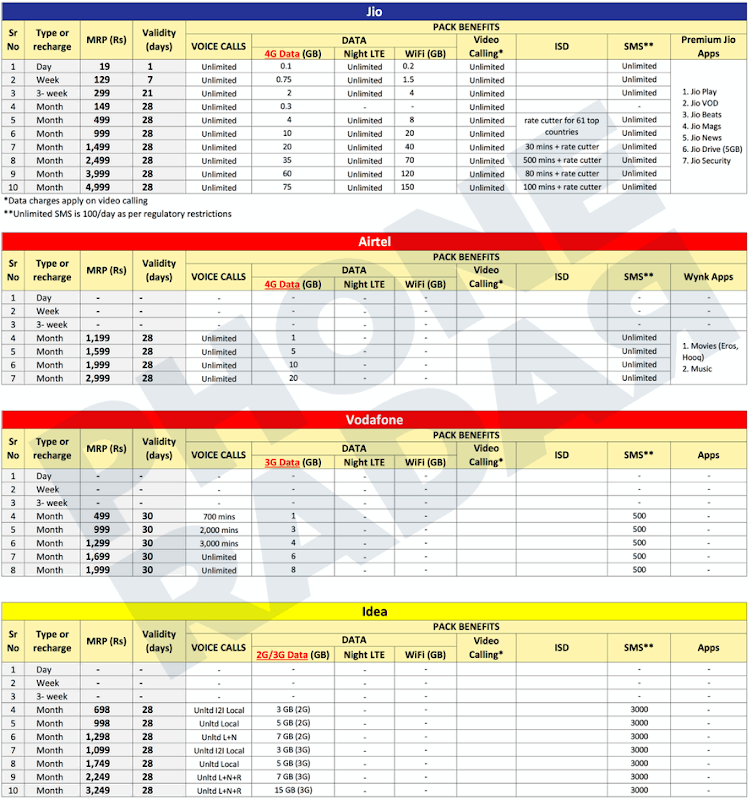
Reliance JIO Tariff Compared to Other Indian Networks

Reliance JIO announce has been sensational, giving tough competition to other telecom networks like Airtel, Vodafone, Idea and Tata Docomo. With its free unlimited calling and data as cheap as Rs.50 for 1GB of 4G VoLTE, it's going to break the record regarding user base and will be sure a HIT. People are rushing to get their SIM and test out its speeds and connectivity, and so far results are positive.

Many people have augmented on speed throttling done by Reliance JIO, but that could be a phase, and it might get solved soon after its free demo interval is over. We have posted earlier about devices that will support Reliance JIO Sim and how you can get one for yourself, but today we will be looking at all the Tariff plans offered by other Telecom Operators vs. Reliance JIO.

Reliance JIO vs. Airtel vs. Vodafone vs. Idea Tariff Plans Comparison

Check below screenshot that provides a detailed view of the Tariff plans offered by Reliance JIO and other Telecom Networks like Airtel, Vodafone, Idea. (Sorry for the small image :p)

reliance JIO Tariff Plans compared to other Indian Telecom Networks

So on the bigger view, Reliance provides 10GB of Data + Free Voice Calling + Video Calling and Unlimited Message but on the other side Airtel is screwing customers with only 1GB of Data instead of 10GB, so lame, other plans are exciting too, have a look.

So on the whole I am making a shift to Reliance JIO as soon as MNP is available, this will increase my productivity, as more data will help me to stay connected everytime with my business and friends.

What are your view on this, do drop a comment below, I will be happy to see your remarks and if you have opted for Reliance JIO, do mentioned your City and State with speeds you are getting, it will help me to see if Reliance really delivers what they are promising.

Categories

Article How-to All Posts WordPress Android Web design Blogger Plugins CSS Google JQuery Plugins Programming Reviews Web Hosting Blogger Blogging Blogging Tips Tricks Web Development Facebook Git Internet Make Money Online Social Plugins Tips Tips and Tricks Tools Tutorials Windows WordPress Plugins Blogging Tips and Tricks Freebies GSM Google Analytics HTML How To's JavaScript Plugin Development S.E.O SEO SMS SmartPhone Social Media Tips amp; Tricks Top-Most Updates Webmaster Tools Whatsapp Applications Apps Blogger Basics Documentary Downloads Entertainment Gadgets Games Gmail Google AdSense Guest Post IPhone Make Money Blogging SVN Security Softwares Web Hosting Tips and Tricks Wordpress Tips Wordpress Tips and Tricks hostgator iOS Advertising Networks Advertising Technology Affiliates Antivirus Audience amp; Traffic Biography Blog post Blog post Blogger Blogger Errors Blogger Tips Blogger Tools Blogger Widget Blogosphere Bogger Widgets CSS selectors CSS symbols CSS3 Computer amp; Internet Content Writing Coupon Codes Data amp; Analytics Deleted blog Design DoubleClick for Publishers Email and newsletter marketting Email marketing Excel Tips Excel Tips and Tricks Facebook Tricks Feed Feedburner Feedburner subscribers Font Fun GitHub Giveaways Gmail primary inbox Gmail tabs Google sign-in Guides HTML amp; CSS HTML5 Infographics Inspirational Instagram Internet Marketing Internet Tips amp; Tricks Job Listings Knowledge Life Hacks Lists Make-Money Monetization amp; Conversion Monetize Navigation Online Marketing Other PHP Tutorials Passport Publishing amp; Content Quotes RSS Sidebar Smartphones Social Networking Status Tech Tech Blog Technology Telegram Themes UI / UX User Psychology amp; Research VB.Net Web Tools Web browser Widget Windows Tips Windows-10 ad viewability admin notice blogging tools bluehost cherry-pick clone cors custom scrollbar customizer dismissible notices duplicate post feed title git branch git clone gpg gpg2 hybridauth iPad icon font notice responsive wordpress theme same origin policy scrollbar signed git commit smartsvn theme customizer vcs wordpress theme wordpress themes

Blog Archive