How To Send Report To Google About Scrapped Content

 Bloggers probably know more about scrapped content than anyone else, It is really annoying to write an article about one unique topic, and after few dsys see many people copy your article without your permission and paste them on their own website or blogs. In our case people usually do it in order to increase traffic to their own websites. But does that work? In this post, we will took a look at how you can stop people from copying your content.
 when we talk about content copying issue Google is on the top list for helping people free of cost. Before 4 month ago Google annouce a scrap report tool. The new scrapper tool allows you to alert Google about scrapped content by filling out three fields. All you have to do is provide the URL of the page where the content was taken from, the URL where the scraped content appears, the the search result URL that demonstrates the problem. You also have to check a box confirming your site is following Google’s Webmaster Guidelines and is not affected by manual actions. Below we will explain you, how you can send spam report using scrapper tool. These reports are directly to Google spam team and these links also used for find better solution to fight spam. If you don't have webmaster tools account you can send spam report using following link.
Duplicate content confuse search engine. Why? because they have hard time deciding which website or blog is most relevant for user search query. Search engines will never display two identical pieces of of content in the SERPs. This is done to ensure the highest search quality seeing the same content twice is very bad for user and not very interesting for users and also another problem is ranking power is lose when search engine found same content another website. Having same content another site you can lose your lot of traffic coming from Google Search so take it serious issue and send it a report to Google spam team..
First you need three link
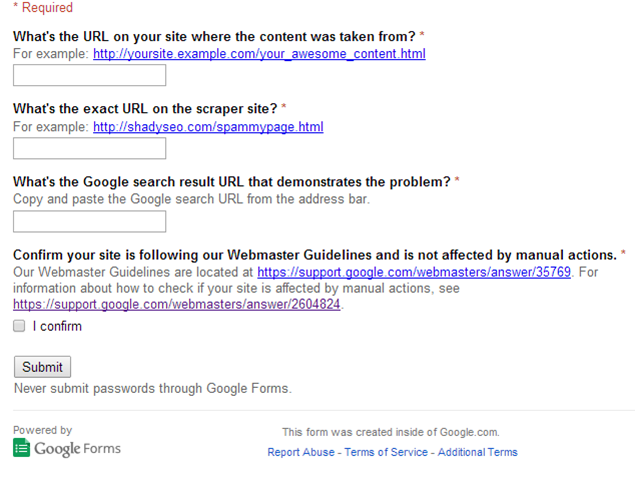
and fill all the required input with required data and First, review the Manual Actions page to see if Google has found any issues with your site and after that don't forget to click on i confirm if your site is not effected by manual actions.
and click submit you are done..!!
Login to your account on Google Webmaster Tools, and check if you have received any manual actions against your website. Click on “Search Traffic” and “Manual Actions”.
It’s important to note that the Scraper Report tool does not promise any kind of fix, or give any indication of what Google intends to do with the information you submit to them. Google
So, what're your thoughts on it? Leave your 'good' comments in the section below.
Send Spam report without webmaster tools account
Google Word
If you see pages with scraped content ranking above or instead of the original, please tell us more about it.
Why Is Duplicate Content Bad?
Duplicate content confuse search engine. Why? because they have hard time deciding which website or blog is most relevant for user search query. Search engines will never display two identical pieces of of content in the SERPs. This is done to ensure the highest search quality seeing the same content twice is very bad for user and not very interesting for users and also another problem is ranking power is lose when search engine found same content another website. Having same content another site you can lose your lot of traffic coming from Google Search so take it serious issue and send it a report to Google spam team..
How you can send scrapped content report to Google
First you need three link
- What's the URL on your site where the content was taken from?
- What's the exact URL on the scraper site?
- What's the Google search result URL that demonstrates the problem?
Then copy link below and paste in your browser address bar Press enter you can the form like we showing in screen shot below fill the form
Field and click on sumbit button after cliking on sumbit your done....
https://docs.google.com/forms/d/1Pw1KVOVRyr4a7ezj_6SHghnX1Y6bp1SOVmy60QjkF0Y/viewform

and fill all the required input with required data and First, review the Manual Actions page to see if Google has found any issues with your site and after that don't forget to click on i confirm if your site is not effected by manual actions.
and click submit you are done..!!
Checking for a manual penalty
Login to your account on Google Webmaster Tools, and check if you have received any manual actions against your website. Click on “Search Traffic” and “Manual Actions”.
It’s important to note that the Scraper Report tool does not promise any kind of fix, or give any indication of what Google intends to do with the information you submit to them. Google
So, what're your thoughts on it? Leave your 'good' comments in the section below.
Image Credit:- shutterstock


 A free tool is better than no tool. Google announced (27 May) on the webmaster central blog that the Fetch as Google feature of Webmaster Tools will now show how GoogleBot would render the page. As expected, Google going to help webmaster determine what JavaScript, CSS, and other resources they are blocking from GoogleBot's crawl.
